
AMAZING FACTS: DUBAI

5 Amazing Facts About Dubai
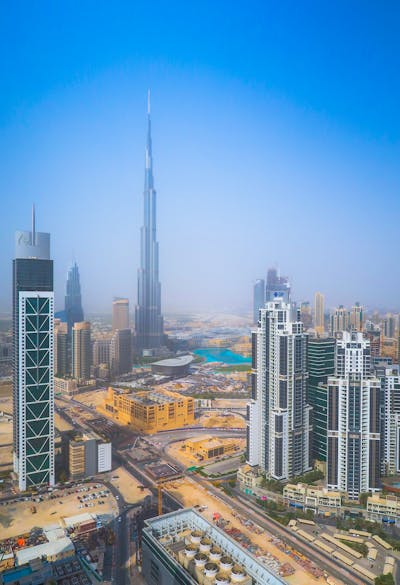
5 Amazing Facts About Dubai

Courtsey: Pexels

Fact 1: Burj Khalifa - Tallest Building

Dubai is home to the Burj Khalifa, the tallest building in the world, standing at 828 meters (2,722 feet).

Fact 2: Palm Jumeirah - Artificial Archipelago

Dubai is known for its incredible engineering projects, including the Palm Jumeirah, an artificial archipelago shaped like a palm tree.

Fact 3: Luxury Shopping at Dubai Mall

The Dubai Mall is one of the largest shopping malls globally and features over 1,200 shops, an indoor ice rink, and an aquarium.

Fact 4: Ski Dubai - Indoor Ski Resort

Dubai is home to Ski Dubai, an indoor ski resort located in the Mall of the Emirates, offering year-round skiing and snowboarding.

Fact 5: Burj Al Arab - Iconic 7-Star Hotel

The Burj Al Arab is often referred to as the world's only 7-star hotel, known for its luxurious accommodations and distinctive sail-shaped architecture.

#rg
#rgdimension
#amazing facts

Popular posts from this blog

25 Angular Intermediate Interview Questions & Answers | RG Dimension

25 Angular Intermediate Interview Questions and Answers (2025 Edition) | rgdimension 25 Angular Intermediate Interview Questions & Answers (Updated for Angular 17–18) Concise, clear answers covering modern Angular (standalone components, signals, inject(), hydration, control-flow, DI, RxJS, performance, and testing). Courtsey: Pexels 1. What are standalone components and when should you use them? Standalone components (introduced and stabilized in recent Angular releases) allow components, directives, and pipes to be declared without NgModules; they declare their own dependencies via the standalone: true flag and import array, which simplifies app structure, reduces boilerplate, and makes lazy-loading and micro-frontends easier — prefer standalone components for new features and greenfield apps while incrementally migrating module-based code when beneficial. /* e...

CSS Flexbox: Understanding the basics

Understanding CSS Flexbox: A Complete Guide Understanding CSS Flexbox: A Complete Guide What Is Flexbox? Flexbox, or the Flexible Box Layout, is a CSS layout module designed to align and distribute space among items in a container, even when their sizes are dynamic or unknown. It simplifies creating responsive and flexible web designs. Why Use Flexbox? Flexbox eliminates complex float and positioning hacks. It allows developers to easily align elements vertically and horizontally and to control spacing, order, and responsiveness effortlessly. How Flexbox Works When you apply display: flex; to a container, it becomes a flex container. All its direct children become flex items that follow the Flexbox rules for layout a...

CSS Interview Questions And Answers

50 CSS Interview Questions and Answers 50 CSS Interview Questions and Answers 1. What does CSS stand for? CSS stands for Cascading Style Sheets. It’s used to style and layout web pages. 2. What is the difference between inline, internal, and external CSS? Inline CSS applies styles directly to elements, internal CSS is within a <style> tag in HTML, and external CSS uses a separate .css file. 3. What are CSS selectors? Selectors are patterns used to select and style elements on a web page. 4. What is the use of the z-index property? z-index controls the stacking order of elements that overlap. 5. What are pseudo-classes in CSS? Pseudo-classes define a special state of an element, like :hover or :focus. 6. What are pseudo-elements? Pseudo-elements style specific parts of an element, like :...